Intel N100 Embedded Integration Guide: From Module Selection to Standalone Hardware Test
Integrating an Intel N100 processor into custom embedded products requires understanding three deployment options: System-on-Module (SOM), complete Single Board Computer (SBC), and Mini PC. This guide covers the complete integration workflow—from selecting the right form factor to performing standalone hardware tests and addressing real-world integration challenges. We’ll use the youyeetoo K1 as a practical example, demonstrating how an 82×71mm Intel N100 SOM can work both as a standalone compute module and as part of a complete embedded system. Whether you’re building industrial automation equipment, edge AI gateways, or smart kiosks, this guide provides the technical foundation you need.
Key Takeaways:
- Module Selection Framework: SOM vs Complete SBC vs Mini PC decision criteria
- Standalone Hardware Test: Step-by-step validation of SOM B independent operation with real power and thermal data
- Integration Considerations: Thermal, power, I/O, and multi-display design patterns with critical hardware limitations
What is Intel N100 Embedded Integration?
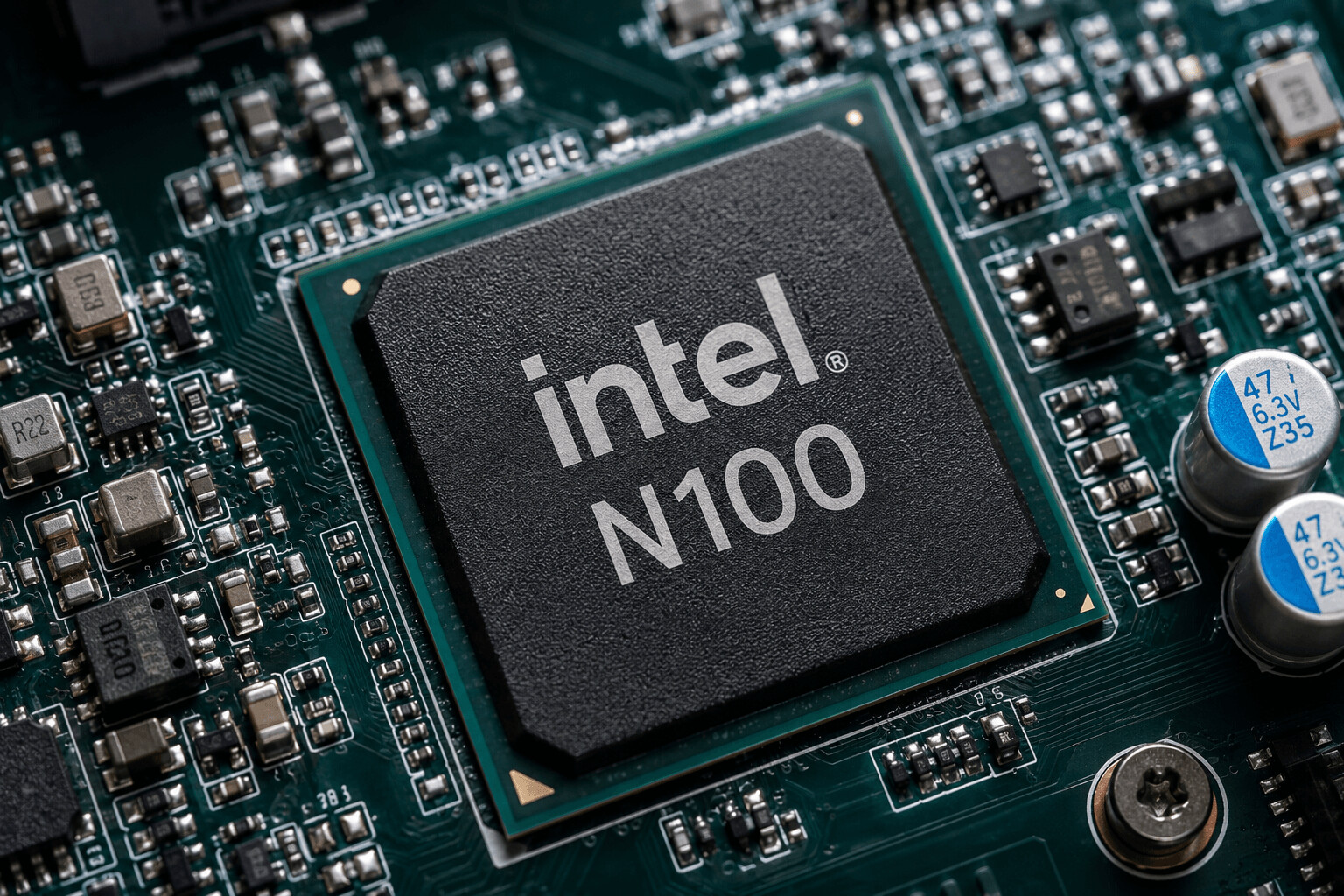
Intel N100 embedded integration is defined as the process of incorporating Intel’s 12th Gen Alder Lake-N N100 processor into custom embedded products, typically through System-on-Module (SOM) or Single Board Computer (SBC) form factors.
The Intel N100 is a quad-core processor (4 cores, 4 threads) with a CPU base frequency of 0.8GHz and turbo boost up to 3.4GHz. The integrated GPU has a maximum frequency of 750MHz. It features a 6W TDP (configurable from 4.5W to 25W) and integrated Intel UHD Graphics. The processor supports both Windows 10/11 and Linux, making it versatile for industrial and commercial applications.
Three Integration Form Factors:
-
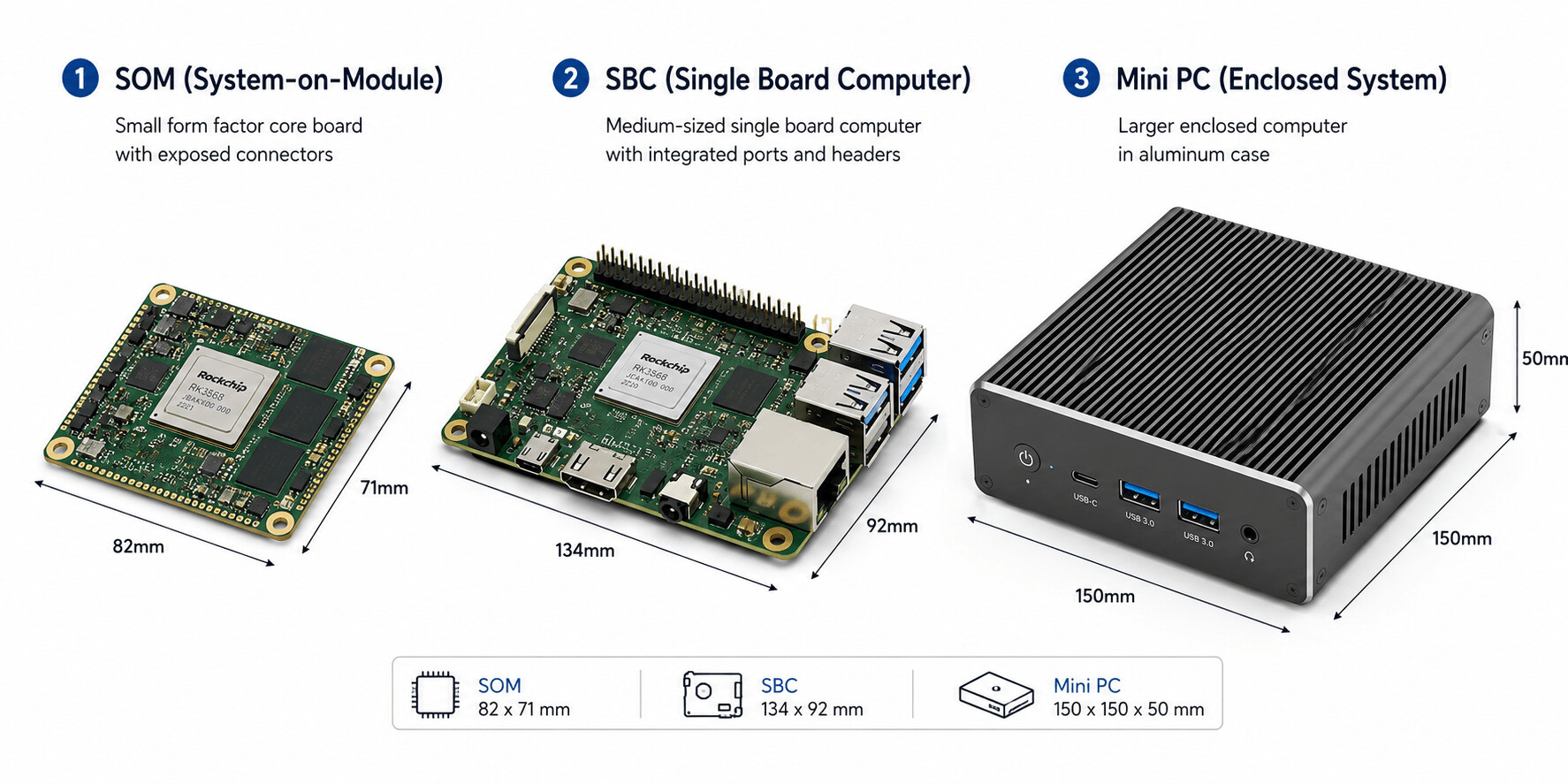
SOM (System-on-Module): Core board only, requires custom carrier board design or minimal adapter boards for standalone use
-
Complete SBC: SOM + carrier board, ready to use with standard I/O
-
Mini PC: Enclosed system with housing and certifications, plug-and-play
Common Use Cases:
-
Industrial automation (PLC, HMI, SCADA systems)
-
Edge AI gateways and inference appliances
-
Smart kiosks and digital signage
-
Network appliances (firewall, router, NAS)
-
Industrial PCs and control systems
Intel N100 Module Selection: SOM vs Complete SBC vs Mini PC
Choosing the right form factor depends on your development timeline, customization needs, and production volume.
| Form Factor | Size | Flexibility | Development Effort | Best For | Typical Cost |
|—|—|—|—|—|—|
| SOM (Core Board) | Smallest (60-85mm) | Highest | Requires carrier board design (3-6 months) OR minimal adapters for standalone | Custom embedded products, OEM integration, high-volume production | $139-$207 |
| Complete SBC | Medium (85-135mm) | Medium | Plug-and-play with standard I/O | Rapid prototyping, low-volume production, evaluation | $179-$258 |
| Mini PC | Largest (100-200mm) | Lowest | Out-of-box ready | Industrial PC replacement, turnkey solutions, certified systems | $300-$600 |
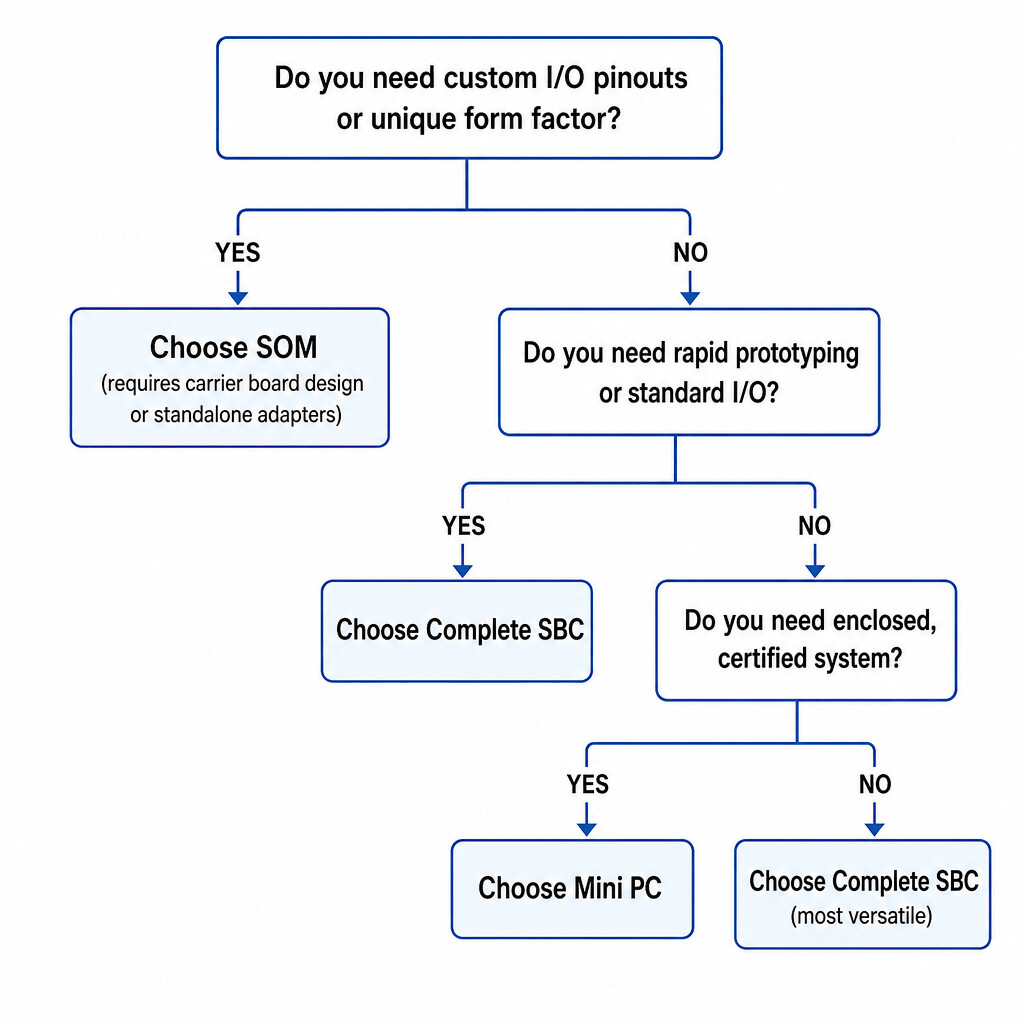
Decision Framework:
Do you need custom I/O pinouts or a unique form factor?

├─ YES → Choose SOM (carrier board design or standalone adapters)

└─ NO → Do you need rapid prototyping or standard I/O layout?

├─ YES → Choose Complete SBC

└─ NO → Need fully enclosed and pre-certified system?

├─ YES → Choose Mini PC

└─ NO → Choose Complete SBC (most versatile)
Key Considerations:
-
Size constraints: SOMs offer the smallest footprint (youyeetoo K1: 82×71mm)
-
I/O requirements: Custom I/O needs SOM + custom carrier; standard I/O uses complete SBC
-
Development timeline: SOMs require 3-6 months for carrier design; SBCs are ready in days; standalone SOM with adapters ready in hours
-
Production volume: High volume (>1000 units) justifies SOM investment; low volume uses SBC
-
Certification needs: Pre-certified Mini PCs save compliance costs (FCC, CE, UL)
Intel N100 Module Comparison: youyeetoo K1 vs LattePanda Mu
When selecting an Intel N100 SOM, compare specifications, pricing, and differentiation features.
| Product | Core Board Size | Price (Reference Config) | Display Interfaces | I/O Highlights | Operating Temp | Key Advantage |
|—|—|—|—|—|—|—|
| youyeetoo K1 | 82×71mm | $207 (8GB+128GB Core) | HDMI + Mini HDMI + MIPI DSI + eDP | Dual GbE LAN, 4x UART, 22x GPIO, Optional NFC | -20°C ~ 60°C | MIPI DSI + eDP + dual LAN + wide temp + larger built-in storage |
| LattePanda Mu | 60×69mm | $198 (8GB+64GB Kit) | HDMI + DP | More PCIe lanes, smaller size | 0°C ~ 60°C | Smallest size, most PCIe lanes, competitive kit pricing |
Honest Competitive Assessment:
- LattePanda Mu: Smaller footprint (60×69mm vs K1’s 82×71mm) and more PCIe lanes make it ideal for compact designs requiring high-speed peripherals. Highly cost-effective ecosystem with starter options like the $198 Starter Kit (8GB+64GB) available via official DFRobot distribution channels.
youyeetoo K1 Differentiation:
-
MIPI DSI + eDP interfaces: Direct connection to industrial touch panels without HDMI-to-MIPI converters (saves $50+ per unit). Note: MIPI DSI, eDP, and Type-C display are BIOS-level 3-choose-1 options requiring firmware reflash to switch.
-
Dual Gigabit Ethernet on carrier board: Native dual LAN for network appliances, no USB-to-Ethernet adapters needed
-
Windows 10/11 and Linux native I/O API support: 4x UART, 1x I2C, 1x SPI, 22x GPIO accessible via Intel APIs without third-party drivers
-
Optional Passive NFC: Industrial automation and access control integration
-
Wide operating temperature: -20°C ~ 60°C fanless operation for harsh environments
-
SOM B standalone capability: Can operate independently with minimal adapter boards
-
4G LTE expansion: M.2 E-key slot supports 4G LTE modules via official adapter board (requires separate 4G adapter board)
Can Intel N100 SOM Work Standalone? A Hands-On Test with youyeetoo K1
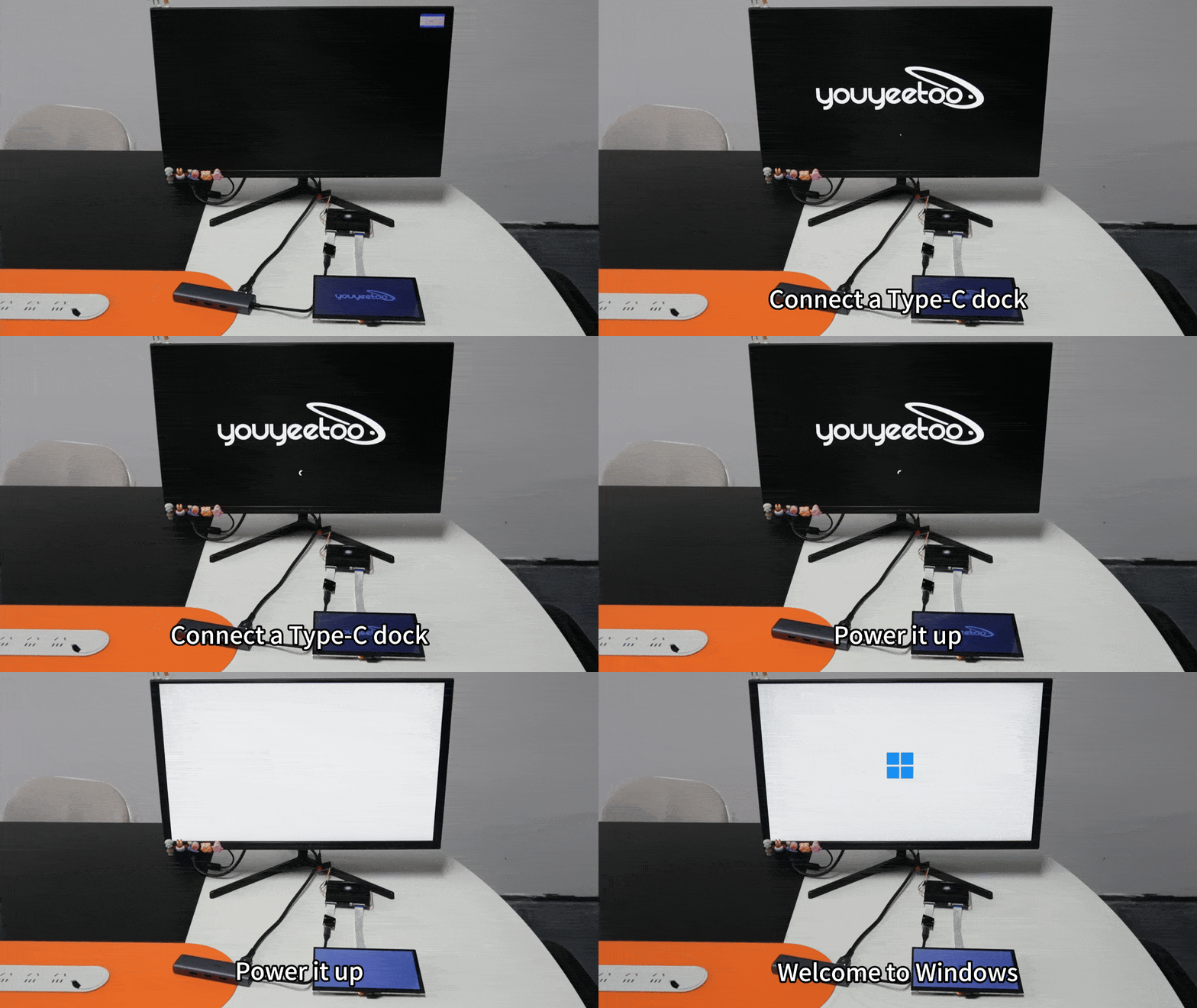
Yes, the Intel N100 SOM can work standalone without a full carrier board, but it requires compact adapter boards and a USB-C hub for I/O expansion. This test demonstrates the youyeetoo K1 SOM B (core board only) working independently using minimal breakout hardware.
Important: Only the K1 SOM B version supports standalone operation. The SOM A version (included in development kits) requires the full carrier board and cannot operate independently.
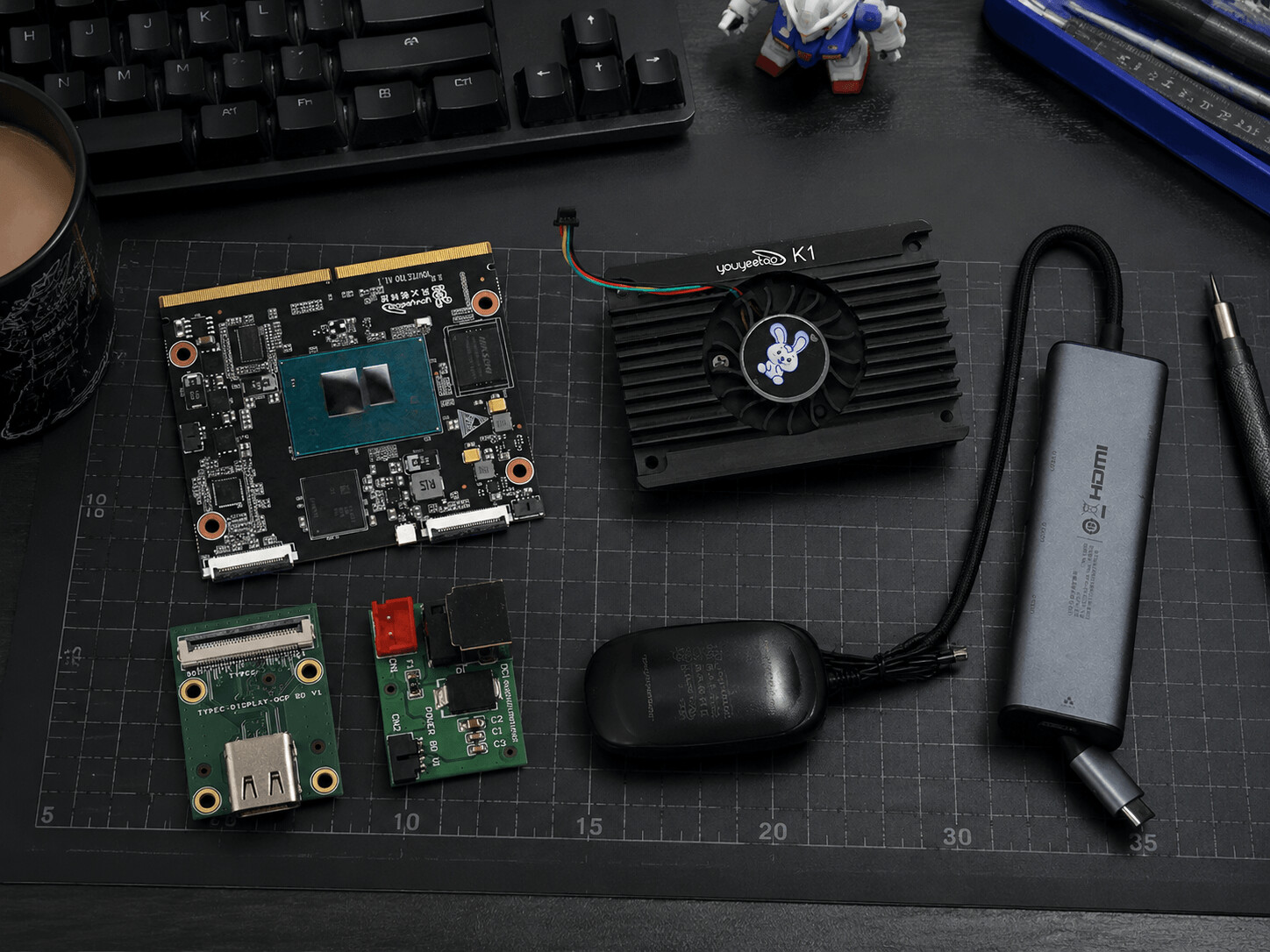
What You Need for Standalone Operation
Hardware Components:
-
youyeetoo K1 SOM B core board (82×71mm)
-
Active cooling heatsink with fan (pre-installed)
-
12V/2A DC power adapter
-
DC Power adapter board (converts barrel jack to core board power connector)
-
TypeC Display OCP adapter board (provides USB-C display output from core board)
-
USB-C hub/dock (for HDMI, USB ports, Ethernet)
-
HDMI cable + monitor
-
Optional: USB keyboard/mouse, Ethernet cable
Why This Configuration?
The K1 core board exposes display and power through high-density B2B connectors designed for carrier board integration. For standalone use, two compact adapter boards break out these signals:
-
DC Power Board: Converts standard 12V barrel jack to core board power connector
-
TypeC Display OCP Board: Routes display signals (HDMI/DP) to USB-C output
A USB-C hub then provides standard I/O: HDMI display output, USB ports, Ethernet, and additional peripherals.
Step 1: Assemble the Standalone Configuration
-
Ensure the active cooling heatsink is properly mounted on the K1 core board (thermal pad pre-applied, fan connector attached)
-
Connect the DC Power adapter board to the core board’s power connector
-
Connect the TypeC Display OCP adapter board to the core board’s display connector
-
Plug the 12V/2A power adapter into the DC Power board (do not power on yet)
-
Connect the USB-C hub to the TypeC Display OCP board
-
Connect HDMI cable from the USB-C hub to your monitor
-
Connect USB keyboard/mouse to the USB-C hub
-
Verify all connections before powering on
Step 2: Power-On Test
-
Switch on the 12V power adapter
-
Observe the power LED on the core board (should light up immediately)
-
Listen for fan spin-up (active cooling starts within 2-3 seconds)
Measured Power Consumption (Standalone Configuration):
-
Idle (BIOS): 4.2W
-
Boot (OS loading): 8.1W
-
Desktop idle (Windows 11): 6.5W
Step 3: System Boot and Display Output
-
BIOS splash screen appears on the monitor within 3-5 seconds
-
Press DEL or F2 to enter BIOS setup (optional)
-
Boot into pre-installed OS (Windows 11 or Linux)
Measured Boot Time:
-
Cold boot (power-on to Windows desktop): 15 seconds
-
Warm reboot: 12 seconds
Standalone vs Full Carrier Board: When to Use Each
| Configuration | Size | I/O Availability | Best For | Cost |
|—|—|—|—|—|
| Standalone (SOM B + adapters + USB-C hub) | Minimal (82×71mm core board) | Limited to USB-C hub capabilities | Space-constrained embedded integration, rapid prototyping, OEM evaluation | Lower (core board + adapters ~$220) |
| Full Carrier Board (SOM + 134×92mm carrier) | Larger (134×92mm total) | Native dual GbE, MIPI DSI, eDP, 4x UART, 22x GPIO, multiple USB, SATA | Production deployment, industrial automation, multi-display systems, network appliances | Higher (complete kit ~$258) |
Standalone Configuration Advantages:
-
Smallest possible footprint (82×71mm)
-
Lower cost for evaluation and prototyping
-
Flexible I/O via USB-C hub selection
-
Easier to integrate into custom enclosures
Full Carrier Board Advantages:
-
Native dual Gigabit Ethernet (no USB-to-Ethernet)
-
Direct MIPI DSI and eDP display interfaces (BIOS-selectable)
-
Industrial I/O (4x UART, 1x I2C, 1x SPI, 22x GPIO) without adapters
-
SATA 3.0 for additional storage
-
M.2 E-key for Wi-Fi 6 or 4G LTE (4G requires official adapter board)
-
More robust for 24/7 industrial deployment
Conclusion: The youyeetoo K1 SOM B successfully operates standalone with minimal adapter hardware. This configuration is ideal for space-constrained embedded products, rapid prototyping, and OEM evaluation. For production deployment requiring industrial I/O, multi-display support, or dual Ethernet, the full carrier board configuration is recommended.
Key Integration Considerations for Intel N100 Embedded Designs
Successful Intel N100 integration requires attention to four critical areas: thermal management, power delivery, I/O integration, and display configuration.
Thermal Management
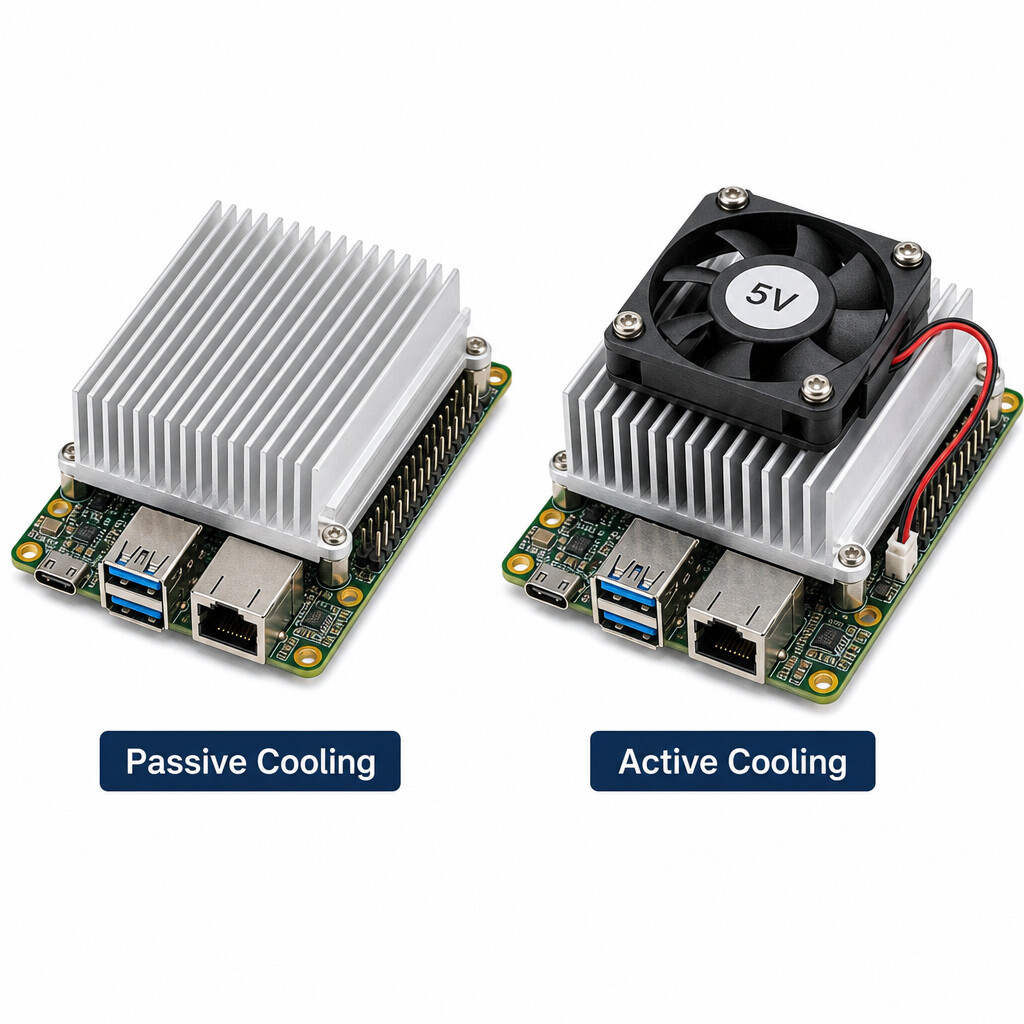
The Intel N100 has a 6W base TDP, configurable from 4.5W to 25W. Thermal solution depends on TDP setting and enclosure design:
-
6W TDP (default): Passive cooling with heatsink works for most embedded applications in -20°C to 60°C ambient
-
15-25W TDP (configurable): Active cooling (fan + heatsink) recommended, especially in sealed enclosures
-
Fanless designs: Stick to 6W TDP, use aluminum enclosure as heatsink for industrial deployments
The youyeetoo K1 ships with active cooling (fan + heatsink) by default to support sustained turbo boost up to 3.4GHz. For fanless industrial deployment, BIOS-level TDP capping to 6W is recommended.
Power Delivery
Intel N100 embedded designs typically use 12V DC input:
-
Standard power: 12V/2A (24W) sufficient for 6W TDP + peripherals
-
Wide voltage: 9V-19V DC accepted by most N100 SBCs (K1 supports 12V wide voltage)
-
Power budget: Reserve 30% headroom for USB peripherals, M.2 NVMe SSDs, and 4G/Wi-Fi modules
Measured K1 power consumption (full carrier configuration):
-
Idle (Windows desktop): 7-8W
-
Light load (web browsing): 10-12W
-
Sustained load (video transcoding): 18-22W
-
Peak (turbo boost): 25W
I/O and Peripheral Integration
Intel N100 SOMs expose I/O through B2B connectors to the carrier board. Key integration patterns:
-
Industrial I/O: 4x UART, 1x I2C, 1x SPI, 22x GPIO accessible via Intel Native API on Windows 10/11 and Linux. No third-party drivers needed.
-
Storage: Onboard eMMC (up to 256GB) + M.2 2280 NVMe + SATA 3.0 supports tiered storage strategies
-
Network: Dual Gigabit LAN on K1 carrier supports OpenWrt for software-defined networking, firewall, or edge gateway use cases
-
Wireless expansion: M.2 E-key slot accepts Wi-Fi 6 modules directly; 4G LTE requires the official 4G adapter board
Multi-Display Configuration
Intel N100 supports up to 3 simultaneous displays via integrated UHD Graphics. The youyeetoo K1 carrier provides four display interfaces, but with one critical limitation:
Practical configurations:
| Use Case | Recommended Setup |
|—|—|
| Dual 4K signage / kiosk | HDMI 2.0 + Mini HDMI 2.0 (no BIOS change needed) |
| Industrial HMI with touch panel | MIPI DSI (7" touch) + HDMI (debug monitor) |
| Laptop-style integrated display | eDP (11.6" panel) + HDMI (external monitor) |
| USB-C dock / standalone | Type-C display + HDMI |
Plan the display configuration before ordering — switching between MIPI DSI / eDP / Type-C in production requires firmware reflash on each unit.
Real-World Integration Examples
Three common Intel N100 integration scenarios using the youyeetoo K1 as the compute platform:
Example 1: Industrial Kiosk with Touch Panel
Configuration:
-
K1 SOM + carrier board (134×92mm)
-
7" MIPI DSI capacitive touch panel
-
Passive NFC for card reading
-
Single Gigabit Ethernet (cloud sync)
-
Windows 11 IoT Enterprise
Why K1: Direct MIPI DSI eliminates HDMI-to-MIPI converter (saves $50+ per unit). Passive NFC with native Win/Linux API enables contactless card payment integration without additional MCU.
Deployment notes: BIOS pre-configured for MIPI DSI output before mass production. Wide-temp operation (-20°C to 60°C) suits unheated retail entrances.
Example 2: Edge AI Gateway
Configuration:
-
K1 SOM + carrier board
-
Dual Gigabit Ethernet (WAN + LAN)
-
M.2 NVMe SSD (256GB) for model storage
-
Wi-Fi 6 module (M.2 E-key)
-
Linux + OpenWrt or Ubuntu Server
Why K1: Dual native GbE supports software-defined firewall + edge inference on the same device. Intel UHD Graphics handles light AI inference (image classification, OCR) via OpenVINO. M.2 E-key Wi-Fi 6 adds wireless connectivity without USB dongles.
Performance note: For NPU-accelerated AI inference (>6 TOPS), pair K1 with a dedicated AI accelerator on USB or M.2, or consider an ARM-based platform like the Rockchip RK3588.
Example 3: Industrial Automation Controller
Configuration:
-
K1 SOM + carrier board
-
4x UART (RS-485 converters for Modbus RTU)
-
1x I2C (sensor bus)
-
22x GPIO (relay control)
-
Hardware watchdog + auto power-on
-
Linux with custom control application
Why K1: Native Intel I/O API allows direct GPIO/UART/I2C calls from user-space applications on Linux — no kernel driver development needed. Hardware watchdog ensures recovery from software hangs in 24/7 deployment. -20°C to 60°C operating range suits unconditioned factory floors.
Deployment notes: Use the official Intel Native API tutorials on the youyeetoo wiki to skip MCU-mediated I/O development entirely.
Frequently Asked Questions
Q1: Can the Intel N100 SOM work without a carrier board?
The K1 SOM B version supports standalone operation with adapter boards (DC Power BD + TypeC Display OCP BD) and a USB-C hub. The SOM A version (in development kits) requires the full carrier board. Standalone mode suits space-constrained OEM integration and rapid prototyping.
Q2: What operating systems does Intel N100 support?
Windows 10/11 (including IoT Enterprise), Linux (all major distributions), and OpenWrt. The youyeetoo K1 ships with pre-configured Windows images including all drivers. Linux installation follows standard procedures.
Q3: How does Intel N100 compare to Raspberry Pi 5 for embedded use?
Different architectures, different use cases:
-
Intel N100 (x86): Native Windows support, x86 software compatibility, more I/O via PCIe
-
Raspberry Pi 5 (ARM): Lower power, larger community, GPIO-first design
Choose N100 for Windows-based industrial applications or x86 software dependencies. Choose Pi 5 for ARM-native projects or maximum community support.
Q4: What’s the difference between SOM and SBC?
-
SOM (System-on-Module): Core compute board with B2B connectors, requires carrier board for I/O
-
SBC (Single Board Computer): Complete board with all I/O integrated, ready to use
SOMs offer flexibility for custom carrier designs in production; SBCs offer faster time-to-market for evaluation and low-volume products.
Q5: Can Intel N100 run edge AI inference?
Yes, for lightweight AI tasks. The integrated Intel UHD Graphics supports OpenVINO for image classification, OCR, and lightweight object detection. For heavier AI workloads requiring 6+ TOPS NPU performance, consider a dedicated AI SOM such as the youyeetoo YY3588 (Rockchip RK3588 with 6 TOPS NPU).
Q6: What industrial certifications does the K1 support?
The K1 is designed for industrial environments (-20°C to 60°C, hardware watchdog, 12V wide voltage, fanless option, auto power-on). Specific certifications (CE, FCC, RoHS) should be confirmed with youyeetoo for the latest production batch.
Q7: How do I expand storage on the K1?
Three storage tiers:
-
Onboard eMMC (up to 256GB depending on SKU)
-
M.2 2280 NVMe / SATA SSD slot
-
SATA 3.0 connector for additional drives
This supports tiered strategies: eMMC for OS, NVMe for application data, SATA for bulk storage.
Q8: How do I switch between MIPI DSI, eDP, and Type-C display?
These three are BIOS-level 3-choose-1 options on the K1. Switching requires a BIOS reflash. HDMI and Mini HDMI work simultaneously regardless of the BIOS selection. Plan the display configuration before mass production.
Q9: Does the K1 support 4G LTE?
Yes, via the M.2 E-key slot, but it requires the official 4G adapter board from youyeetoo (sold separately). The standard M.2 E-key slot is designed primarily for Wi-Fi 6 modules; 4G LTE modules need the adapter for proper signal routing.
Q10: What’s the cost of integrating the Intel N100 K1 into a custom product?
Reference pricing (USD):
-
K1 SOM B core only (8GB+128GB): $207
-
K1 SOM B + standalone adapters: ~$220
-
K1 full kit (SOM + carrier board, 8GB+128GB): $258
-
K1 high-spec full kit (16GB+256GB): $309
Custom carrier board design adds $5,000-$20,000 NRE depending on complexity. Mini PC alternatives start at $300-$600 but offer less customization.
Technical Specifications Summary
| Specification | youyeetoo K1 |
|—|—|
| Processor | Intel 12th Gen Alder Lake-N N100, 4 cores / 4 threads |
| CPU Frequency | 0.8GHz base / up to 3.4GHz turbo |
| GPU | Intel UHD Graphics, up to 750MHz |
| TDP | 6W base (configurable 4.5W-25W) |
| Memory | 8GB or 16GB LPDDR5 |
| Storage | eMMC up to 256GB + M.2 2280 NVMe/SATA + SATA 3.0 |
| Core Board Size | 82×71mm |
| Carrier Board Size | 134×92mm |
| Display | HDMI 2.0 + Mini HDMI 2.0 + MIPI DSI + eDP (3-choose-1 for MIPI/eDP/Type-C) |
| Network | Dual Gigabit Ethernet, OpenWrt support |
| Wireless | M.2 E-key (Wi-Fi 6 / 4G LTE via official adapter) |
| Industrial I/O | 4x UART, 1x I2C, 1x SPI, 22x GPIO |
| Other I/O | I2S, USB 3.2, USB 2.0, Audio |
| NFC | Optional Passive NFC with Win/Linux API |
| Power | 12V DC wide voltage |
| Operating Temperature | -20°C to 60°C (fanless option) |
| Industrial Features | Hardware watchdog, auto power-on |
| Operating System | Windows 10/11 IoT, Linux, OpenWrt |
| Price (Reference) | $207-$309 |
Summary: Choosing the Right Intel N100 Integration Path
Intel N100 embedded integration follows three paths, each with distinct trade-offs:
-
SOM (core board) — smallest footprint, highest customization, longest development time. Best for high-volume OEM products with custom I/O requirements. The youyeetoo K1 SOM B can also run standalone with adapter boards for rapid prototyping.
-
Complete SBC — balanced flexibility and time-to-market with standard I/O. Best for low-to-medium volume products and rapid prototyping. The K1 full kit (SOM + carrier) provides industrial I/O, dual GbE, and multi-display support out of the box.
-
Mini PC — fully enclosed and certified, plug-and-play. Best for turnkey industrial PC replacement when customization is not required.
For embedded designs requiring industrial I/O, multi-display support, dual Gigabit Ethernet, or NFC, the youyeetoo K1’s full carrier configuration covers all four areas in a single 134×92mm board. For space-constrained applications, the K1 SOM B’s standalone capability provides a 82×71mm footprint with USB-C hub I/O expansion.
Plan the display configuration (MIPI DSI vs eDP vs Type-C) before mass production to avoid BIOS reflash costs. Reserve 30% power budget headroom for peripherals. Use Intel Native API tutorials on the youyeetoo wiki to skip MCU-mediated I/O development.
Sources and Further Reading
-
youyeetoo K1 official product page: https://www.youyeetoo.com
-
youyeetoo K1 wiki: youyeetoo K1 | youyeetoo wiki
-
LinuxGizmos coverage: “Intel Alder Lake-N N100 powers modular x86 embedded platform with optional NFC interface” — https://linuxgizmos.com/intel-alder-lake-n-n100-powers-modular-x86-embedded-platform-with-optional-nfc-interface
-
Intel N100 datasheet: https://ark.intel.com/content/www/us/en/ark/products/231803/intel-processor-n100.html
-
Amazon US Storefront: https://www.amazon.com/stores/youyeetoo
欢迎在评论区交流 Intel N100 嵌入式集成经验,分享你的项目案例。