Q: the wireless module doesn’t seem to work at all. I have tried many firmwares and it will not recognize. do you know of a specific fw that will fix this? or is this a bad board/module?
Google Drive: https://drive.google.com/file/d/1PZf443Yu1KdiUiBOlF89s9PVyaW30SmU/view?usp=sharing
Google Drive: BPI-R4-WIFI-SDK - Google 雲端硬碟
Note:
MTK vendor’s MP3.1 wifi image package name: BPI-R4-BE1350-WIFI_MP3_1-SDK-20240202.zip
opensource MT76 wifi image package name : BPI-R4-BE1350-WIFI_MT76-20240202.zip
MTK vendor’s MP3.1 wifi driver sourcecode can’t be open source. only release Image. But supply all MT76 wifi driver sourcecode.(support Quectel RM500U-CN & RM520N-GL 5G Modules, EC25 EM05 4G Modules)
Brush system link:
Note: You can only burn NAND via SD card. If you need burn emmc, you need to boot via NAND.
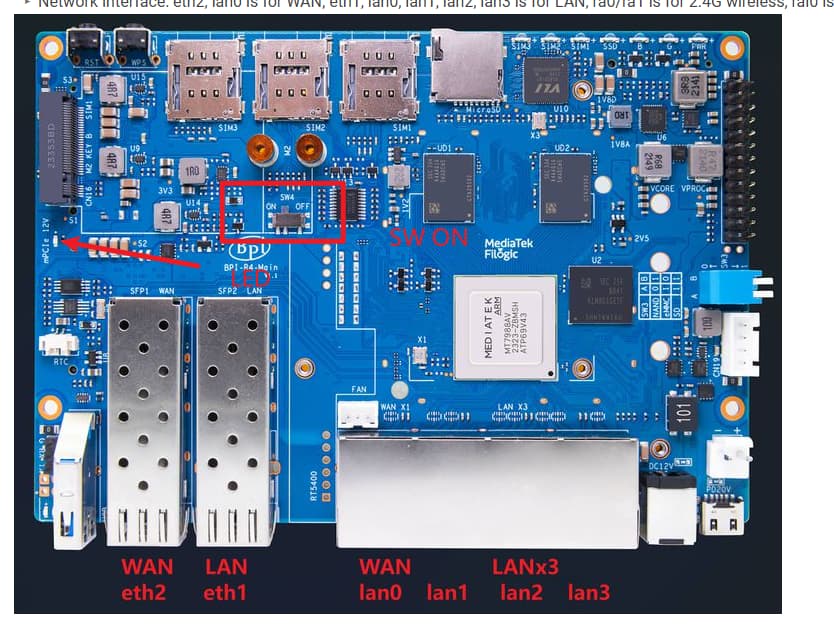
Please make sure the WiFi power is turned on after reflashing the system.
You may consider purchasing one of our assembled R4 WIFI7 kits if you fail to solve the problem.
MediaTek MT7988A (Filogic 880) quad-core Arm Corex-A73,1.8GHz processor 4GB/8GB DDR4,8GB eMMC flash, 128MB SPI-NAND Flash Micro SD card slot 2x 10Gbe SFP slot (option 1x 10Gbe SFP and 1x SOC embedded 2.5Gbe PHY. NOTE: Need to modify hardware) 4x GbE...
Price: USD 236.47
You can also find it on Amazon.
How to reflash BPI-R4.
Note: You can only burn NAND via SD card. If you need burn emmc, you need to boot via NAND.
EMMC
mount /dev/sda1 /mnt/sda1 ;
echo 0 > /sys/block/mmcblk0boot0/force_ro ;
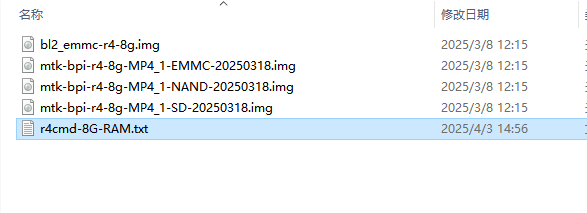
dd if=/your path/8G/bl2_emmc-r4-8g.img of=/dev/mmcblk0boot0 ;
dd if=/your path/mtk-bpi-r4-8g-MP4_1-EMMC-20250318.img of=/dev/mmcblk0 ;
mmc bootpart enable 1 1 /dev/mmcblk0 ;
For example, My firmware is stored on a USB drive, and the mount directory for the USB drive is usually /mnt/sda1. Since I have distinguished between 4G and 8G firmware, the final form is
mount /dev/sda1 /mnt/sda1 ;
echo 0 > /sys/block/mmcblk0boot0/force_ro ;
dd if=/mnt/sda1/8G/bl2_emmc-r4-8g.img of=/dev/mmcblk0boot0 ;
dd if=/mnt/sda1/8G/mtk-bpi-r4-8g-MP4_1-EMMC-20250318.img of=/dev/mmcblk0 ;
mmc bootpart enable 1 1 /dev/mmcblk0 ;
mount /dev/sda1 /mnt/sda1 ;
echo 0 > /sys/block/mmcblk0boot0/force_ro ;
dd if=/mnt/sda1/4G/bl2_emmc-r4.img of=/dev/mmcblk0boot0 ;
dd if=/mnt/sda1/4G/mtk-bpi-r4-MP4_1-EMMC-20241216.img  of=/dev/mmcblk0 ;
mmc bootpart enable 1 1 /dev/mmcblk0 ;
NAND Flash
mount -t vfat /dev/sda1 /mnt
mtd erase /dev/mtd0
dd if=/mnt/sda1/4G/mtk-bpi-r4-MP4_1-NAND-20241216.img of=/dev/mtdblock0
mount -t vfat /dev/sda1 /mnt
mtd erase /dev/mtd0
dd if=/mnt/sda1/8G/mtk-bpi-r4-8g-MP4_1-NAND-20250318.img of=/dev/mtdblock0